Tuni: AI Music Video Maker
- 4.6
- Rating
- 10.00K
- Installs
- Free
- Price

 Analysis by App-foxy
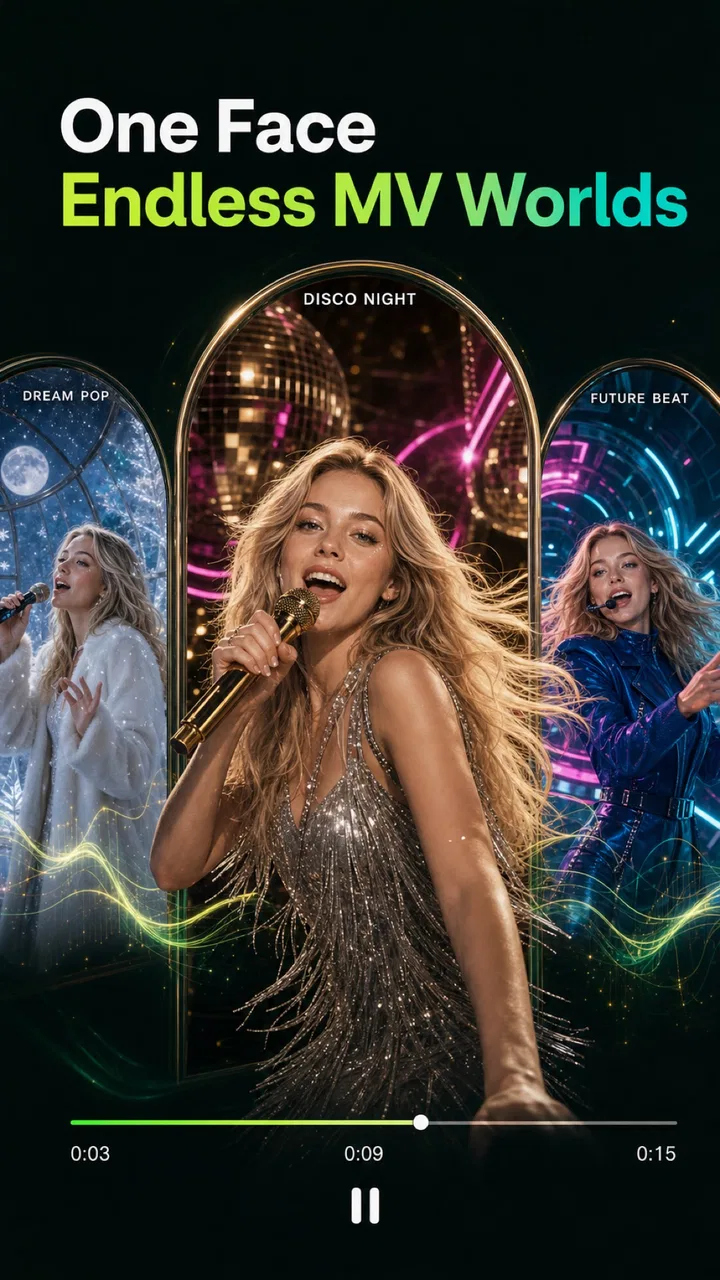
I tried Tuni: AI Music Video Maker as a creative music and audio app, and its most interesting idea is simple: start with an AI-made song, then give that music a visual identity through characters, scenes, and styles. That combination makes it feel less like a traditional music player and more like a quick way to turn an audio concept into something shareable.
The app is free to install and is rated for Everyone, which makes it approachable for casual experiments, family-friendly projects, and people who do not want to learn a full video editor. It comes from AI Video Generator - AI Hug & Kiss Video Maker, and its current version is 1.2.9. I would describe it as a lightweight creative tool for people who want a result quickly, rather than a replacement for a professional recording or editing setup.
What drew me in was the connection between sound and visuals. Many music apps stop after helping you discover, play, or arrange audio. Tuni aims to carry the idea further by helping you build a small audiovisual piece around the music. The real strength is the bridge between a song idea and a visual mood. You do not need to begin with finished footage or a carefully planned storyboard to get started.
You May Also Like

 AccuWeather: Weather Radar
AccuWeather Review: A Quick, Clear Forecast for Everyday Decisions
For everyday plans, the best forecast is the one you can understand quickly. AccuWeather makes rain timing, radar, and local conditions easy to act on, with a few trade-offs.

 Hill Climb Racing
Why Hill Climb Racing Still Turns Crashes Into One More Run
A tiny car, a bumpy hill and one more upgrade: Hill Climb Racing keeps resurfacing because its simple chaos makes every near-miss feel personal.

 AliExpress - Shopping App
AliExpress Makes Global Shopping Feel Personal, but Shoppers Bear the Risk
AliExpress turns a global marketplace into a pocket-sized discovery engine. Its reach is useful, its shopping loop compelling, and its trade-offs easy to miss.

 Lords Mobile: Kingdom Wars
Lords Mobile Is a Kingdom-Building Routine, Not a Quick Match
A case-by-case verdict on the building, battles, device demands, and social commitments that make Lords Mobile rewarding for some players and exhausting for others.

 PDF Scanner app - TapScanner
TapScanner Makes Paperwork Easier to Capture, Check, and Share
TapScanner makes scanning with a phone feel less like a rescue operation and more like a dependable step in getting work done. Its capture tools are useful, though not flawless.

 Block Blast!
 Shows How Much a Puzzle Game Can Leave Out
A quiet grid game shows why puzzle players increasingly value instant clarity, repeatable skill and low-pressure play—and where the genre still needs to catch up.
More From Our News Desk
View All News


Turning a song idea into a visual piece
I’d treat the song and its visual direction as a single creative decision, rather than making a track first and adding any scene afterward. That approach helps me notice early whether the mood, character, and setting feel like parts of the same idea. It also makes the next practical question easier to answer: when is Tuni a good fit for the way I actually use my phone?
The capability that matters most
The central workflow is creating AI songs and pairing them with generated video elements. In practical terms, that means the app is useful when the music itself is only half of what you want to make. A short song can become a themed clip, a character-led scene, or a stylized visual post instead of remaining an audio file that few people hear.
I found this especially appealing for users who think in moods rather than technical settings. Someone may have an idea for a cheerful birthday track, a dreamy background song, or a playful character performance without knowing how to write a complete arrangement or edit a sequence. Tuni gives that idea a more visible form. The result is not just “music with a picture”; the visual choices can change how the song feels to another person.
That distinction matters because the app’s value depends on your goal. If you only need to listen to existing albums, a conventional streaming service is a better fit. If you want detailed control over vocal takes, instruments, mixing, transitions, and timing, a digital audio workstation remains more capable. Tuni makes more sense in the middle: it is for turning a creative prompt into a compact music-video-style result without building every part manually.
How the workflow feels in practice
I would approach the app in stages rather than trying to perfect everything at once. First, decide what the song should communicate. Then choose the visual direction that supports that feeling. A bright, energetic track can be weakened by a slow or gloomy scene, while a gentle song may become distracting if the characters and colors are too busy.
The useful habit is to treat the music and the visuals as one project. Instead of choosing a random character after generating a song, I would first imagine the audience and the setting. Is this meant to be a personal greeting, a social post, a small story, or background content for a hobby channel? That decision helps narrow the style and prevents the final clip from feeling like unrelated parts placed together.
Because the app combines generation with presentation, experimentation is part of the process. The first result may communicate the general idea but still feel mismatched in tone. I would keep the concept simple, adjust the style, and compare the overall mood rather than focusing only on whether one visual detail looks impressive. In this kind of tool, consistency usually matters more than complexity.
There is also a practical reason to keep the first project short and focused. A compact idea is easier to judge: you can tell whether the song, character, and scene belong together. Starting with an ambitious story makes it harder to identify whether the problem is the music, the visual style, or the concept itself. Tuni is at its best when you use it to explore an idea quickly, then decide whether that idea deserves more work elsewhere.
A realistic everyday use case
Imagine I want to send a friend a birthday message, but I do not want to use a standard card or a generic slideshow. I could create a short celebratory song, choose a friendly character style, and build a colorful scene around it. The important part is not technical polish; it is that the message has a personal combination of sound and imagery.
This workflow could also suit a parent making a playful clip for a child, a teacher preparing a simple classroom introduction, or a hobby creator testing a character concept. The app’s Everyone age rating makes those everyday situations feel natural, although I would still review anything generated before sharing it, especially when the audience includes children.
Another useful case is idea development. A songwriter might use the app to visualize the emotional direction of a rough concept before spending time on a full production. A small business owner could explore the mood of a social campaign without commissioning a complete video immediately. In both cases, the generated clip works as a sketch. It helps answer, “Does this idea feel right?” before more effort goes into it.
Where it differs from usual music and video tools
Compared with a normal music player, Tuni is more hands-on and creative. It is not primarily about organizing a personal library or discovering established artists. Compared with a standard video editor, it reduces the amount of manual assembly involved in getting from an idea to a themed clip. That convenience is the main reason to choose it.
The trade-off is control. Traditional editors let me place every image, cut every moment, adjust audio levels, and refine timing with precision. A music production app gives deeper control over composition and sound design. Tuni’s appeal is that it handles the broad creative direction, while the user focuses on the concept and the combination of song, character, scene, and style.
That makes it a good companion to more specialized tools rather than a universal replacement. I would use Tuni for the first visual draft or for a quick finished greeting. I would move to a dedicated editor when exact synchronization, branding, subtitles, detailed sound work, or repeatable production mattered more than speed.
The trade-offs I noticed
The biggest limitation is that AI-generated creativity can be unpredictable. A broad idea may produce something attractive but not precisely what I imagined. That is not necessarily a flaw for playful experimentation, but it becomes frustrating if I need a specific character action, exact visual continuity, or a carefully timed musical moment.
There is also a learning curve, even though the app is designed to be accessible. The buttons may be easy to understand, but making good choices still requires taste. A user can select appealing elements individually and end up with a result that feels crowded. My advice is to choose one dominant mood, one clear visual focus, and a song concept that can be understood quickly.
Cost is another consideration. The app is free, but in-app purchases range from $4.99 to $59.99 per item. That does not make the free starting point unattractive, but it does mean I would explore the basic workflow before paying for anything. If you only plan to create one occasional clip, the purchase structure may feel harder to justify than a simple one-time editor. If you expect to experiment often, you should decide in advance how much the convenience is worth to you.
Performance expectations also need to be realistic. AI creation is more involved than pressing play on a music app, so I would use it when I have a stable connection and enough time to review the output. It is not the tool I would choose when I need a finished, perfectly controlled video immediately. The creative process benefits from trying an idea, checking the result, and making a considered adjustment.
Small decisions that improve the result
My first tip is to write the concept in one sentence before opening the generation workflow. For example, “a warm, upbeat song for a friend’s birthday with a playful visual setting” is more useful than simply asking for something “fun.” A clear emotional target makes it easier to reject styles that look attractive but do not serve the message.
My second tip is to choose visuals for the listener, not only for yourself. A scene that looks interesting at first glance may compete with the music. If the song carries the emotion, the characters and setting should support it rather than demand all the attention. This is particularly important for clips intended for social sharing, where viewers may decide within moments whether to keep watching.
My third tip is to use the app as a storyboard generator even when the final result will be edited elsewhere. A Tuni concept can reveal whether a song needs a softer visual treatment, whether a character fits the tone, or whether the idea is too complicated. That makes the app useful beyond its own exported result: it can help shape the direction of a later project.
I would also save a simple record of what worked conceptually. If a particular combination of song mood and scene feels convincing, note the reason: perhaps the visuals were uncluttered, the character matched the audience, or the style made the chorus feel more energetic. This kind of observation is more valuable than endlessly changing random options, because it builds a repeatable creative process.
Who will get the most from it
Tuni is a strong match for beginners who want to make something personal without learning several creative applications at once. It also suits social-media users who prefer original, themed clips to static images, and hobbyists who enjoy testing musical ideas visually. The app’s rating of 4.6 from around 1.9 thousand ratings suggests that its approachable concept has found an interested audience, while over 10 thousand installs show that it is being tried beyond a tiny group of early users.
I can also see value for people who struggle with the blank page. Starting with an empty video timeline can be intimidating. Beginning with a song idea and a visual direction gives the project a center. Even when the generated result is not final, it can provide enough momentum to continue creating instead of abandoning the idea.
On the other hand, I would skip it if my priority were professional audio engineering, exact brand consistency, or detailed frame-by-frame editing. Musicians who need full control of arrangements should use music production software. Video creators who already have footage and want precise cuts may work faster in a conventional editor. Tuni is most useful when speed, accessibility, and imaginative combinations matter more than absolute control.
The app runs on operating system version 11 or newer, so compatibility is worth checking before planning a project. Its free entry point lowers the barrier, but the paid items make it sensible to test the creative workflow first. I would not recommend buying anything until I knew that the available approach matched my preferred style and that the app could produce the kind of clip I actually wanted to share.
My final take on the creative value
After looking at the app as a complete workflow, I think its best feature is not any single song or visual style. It is the way Tuni encourages me to think of music as something that can have a character, setting, and visual personality. That is a useful shift for anyone who has ideas but lacks the time or technical confidence to assemble a full production manually.
The experience is less convincing when I expect exact results or professional-level control. AI generation brings an element of trial and adjustment, and the purchase range means frequent users should consider their spending carefully. Still, those limitations do not erase the app’s purpose. They simply define it: this is a creative sketchbook with the potential to produce shareable music-video-style pieces, not a complete studio.
If I were recommending it to a friend, I would say to begin with one clear occasion or mood, keep the first project focused, and judge the relationship between the song and the visuals as a whole. For birthday messages, playful character ideas, quick social concepts, and early creative experiments, Tuni is worth trying. Choose it when you want to move from “I have a song idea” to “I can show people what that idea feels like.”
FAQs for Tuni: AI Music Video Maker
01What is Tuni: AI Music Video Maker, and what can I create with it?
Tuni: AI Music Video Maker is designed to help users turn music, photos, videos, and creative ideas into stylized music videos. It typically combines automated visual effects, beat-synced editing, templates, and AI-assisted generation tools so you can produce short clips for social media without advanced editing experience. The available results and tools may vary depending on the app version, device, selected template, and subscription plan.
02Is Tuni: AI Music Video Maker free to download and use?
The app may be available to download for free, but some features can require in-app purchases or a paid subscription. Premium templates, higher-quality exports, additional AI effects, watermark removal, or extended usage limits may not be included in the basic version. Before starting a trial or subscription, carefully review the pricing, renewal terms, and cancellation instructions shown in the app store or inside Tuni.
03Can I use my own songs, photos, and video clips in Tuni?
Tuni is intended to work with personal media, allowing users to build videos around their own creative material when the relevant import options are available. You should check which audio and video formats the current version supports, as compatibility can depend on your device. Also, make sure you own or have permission to use imported music, images, and footage, especially if you plan to publish the finished video publicly or commercially.
04Does Tuni require an internet connection, and what permissions does it need?
An internet connection may be necessary for AI processing, downloading templates, synchronizing projects, loading advertisements, or accessing cloud-based features. The app can also request permission to access photos, videos, audio files, notifications, or storage, depending on the tools you use. Review each permission request carefully and grant only what is needed. Availability and performance may be affected by connection speed, device storage, and hardware capability.
05Can I export and share videos made with Tuni without a watermark?
Tuni may let you save finished videos to your device or share them directly to social platforms, but export resolution, duration, file options, and watermark removal can depend on the selected feature or membership level. Free exports may include branding, lower quality, or usage restrictions. Before creating a project for professional or promotional use, check the export preview and the current licensing terms to understand exactly what you can save and publish.
Pros
- Turns simple photos into shareable music videos quickly.
- AI effects add motion and style without editing experience.
- Useful templates help create content for social media.
- Supports creative experimentation with different visual moods.
- Easy export makes finished videos convenient to save and share.
Cons
- AI results can vary noticeably between photos and attempts.
- Some advanced effects or exports may require a subscription.
- Processing time can increase for longer or higher-quality videos.
- The app may need a stable internet connection for AI generation.
- Generated videos may feel repetitive when using the same templates.

Tuni: AI Music Video Maker
Gallery